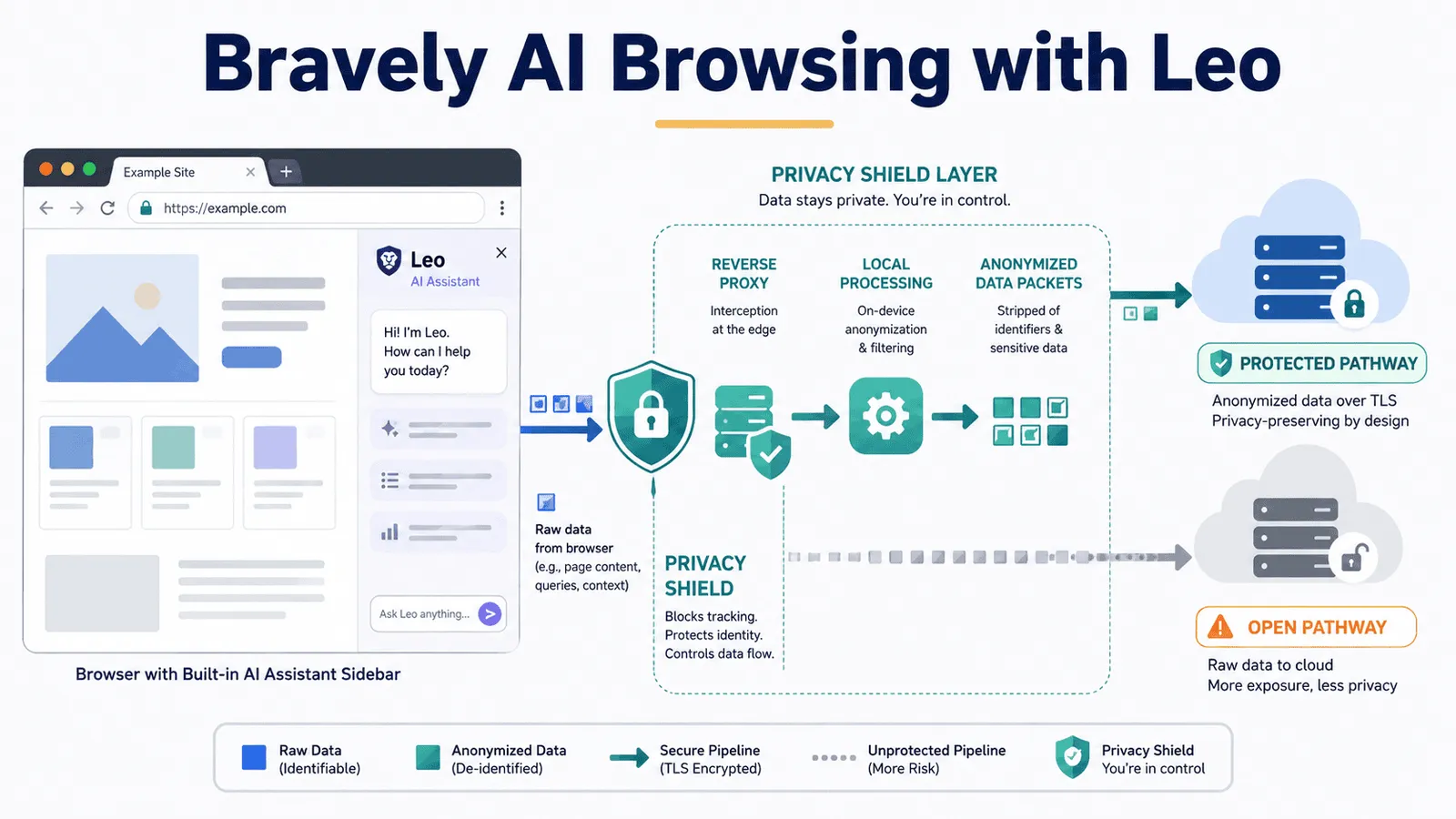
Bravely AI Browsing with Leo
Learn about private AI browsing for data professionals.
以下正文同步自 KDnuggets,版权归原站所有,已转换为易读排版。
Data professionals live in their browsers. You're reading technical documentation, analyzing research papers, reviewing model cards, working through GitHub repositories, and summarizing industry reports — often all in the same afternoon. Increasingly, AI assistants sit alongside that work.
The tools most people reach for (Chrome with Gemini, Perplexity, ChatGPT in a pinned tab) are genuinely capable. But each carries a privacy cost that's easy to overlook when you're focused on getting work done. Consumer Gemini may use your conversations to improve Google's services, and selected conversations can be reviewed by human staff. Perplexity routes your queries and page content to its cloud servers for processing. ChatGPT, unless you actively opt out, can use your inputs for model training.
For casual browsing, this is an acceptable tradeoff. For data professionals working with proprietary datasets, client research, unreleased model architectures, or sensitive business intelligence, it may not be.
Brave Leo is the alternative most people haven't considered. It's a privacy-first AI assistant built directly into the Brave browser — not a separate tab or third-party extension, but a sidebar that reads what you're currently looking at and responds without storing, logging, or training on anything you share. The free tier requires no account and no sign-up. And it has a model lineup that's more capable than most people expect.
This article covers what Leo does, how it compares to the tools you already use, how to set it up, and how to build a private AI workflow around it.
Before getting into Leo's features, it helps to understand what's actually happening when you use mainstream browser AI tools, because the data handling differences are structural, not cosmetic.
When you use Chrome's Gemini, Google's own documentation advises you not to enter anything you wouldn't want a human reviewer to see. The Gemini Nano model is downloaded silently to your device in the background, often without explicit consent. On consumer plans, your inputs can be used for model improvement by default.
When you use Perplexity, you're working with a solid research tool. Its citation-backed answers are genuinely strong, and most data professionals already trust it for exploratory research. But like Gemini, it operates on a cloud-first model where your queries and page content leave your machine.
Safari's Apple Intelligence is the most privacy-respectable mainstream option, processing more work on-device. But it's locked to Apple hardware, which excludes data professionals working on Windows or Linux.
Leo takes a different architectural approach. Queries are routed through a reverse proxy that strips your IP address before they reach the underlying model. Conversations are discarded immediately after a response is generated, so nothing is stored on Brave's servers. No account is linked to your usage. No inputs are used for model training. This is the default behavior for every user, free or paid.
The practical implication: you can paste proprietary documentation, ask questions about an internal dataset schema, or work through a client's unpublished research, and none of it persists beyond your session.
Leo ships with every installation of Brave, available on Windows, macOS, Linux, Android, and iOS. Because Brave is built on the same Chromium engine as Chrome, the transition is low-friction. Your bookmarks, passwords, and extensions import in a few clicks.
Accessing Leo is immediate. You'll find it in the browser sidebar, or by clicking the Leo icon in the toolbar. On desktop, you can also start a conversation from the address bar. No login is required.
Choosing your model is done from within the Leo sidebar. The free tier includes:
For most day-to-day work — summarizing papers, explaining documentation, answering questions about open code — the free tier is sufficient. One reviewer who tested the Premium tier for months said plainly: "I have not paid for it. The free tier has handled everything I actually use Leo for."
Leo Premium costs \$14.99 per month or \$149.99 annually (roughly \$12.50 per month) and covers up to five devices. It unlocks Claude Sonnet 4, DeepSeek R1, Kimi K2.5, and other frontier models, along with higher rate limits and priority access during peak times.
正文由 FLUX 从来源站点 RSS 同步,内容未经改写;遇到排版缺失或需要图片、视频时请以原文为准。